
By 2026, 70% of dental practices have adopted advanced 3D printing techniques, yet the digital handoff remains a frequent source of clinical frustration. You've likely experienced the setback of a scan that looks flawless on your screen but arrives at the lab with missing data or incompatible formatting. Learning how to send stl file for dental model submissions shouldn't be a technical hurdle that slows down your day. It's the essential first step in ensuring every Hawley retainer or RPE fits perfectly the first time.
We agree that your time is best spent with patients, not troubleshooting upload errors or managing communication gaps. This guide will help you master the technical requirements for high-fidelity digital submissions to ensure precision-engineered results. We'll cover the latest updates for MEDIT Link v3.4.10 and 3Shape Dental System 25.3.0, providing a step-by-step workflow for a "one-and-done" upload process. From avoiding non-watertight meshes to selecting the right export settings, you'll gain the tools to improve appliance accuracy and reduce patient chair time.
Key Takeaways
- Learn why the STL format remains the universal standard for 3D printed models and how to perform a pre-export check to capture critical anatomy.
- Follow our guided workflow to send stl file for dental model submissions through our secure portal, ensuring HIPAA compliance and data integrity.
- Identify and repair common mesh issues like "holes" or digital artifacts that cause printing errors and manufacturing delays.
- Discover how Brightline’s meticulous review process optimizes your digital impressions for the high-definition fabrication of Hawley retainers and RPEs.
- Streamline your office workflow with a "one-and-done" upload process designed to reduce patient chair time and enhance appliance precision.
Understanding STL Files in the Orthodontic Workflow
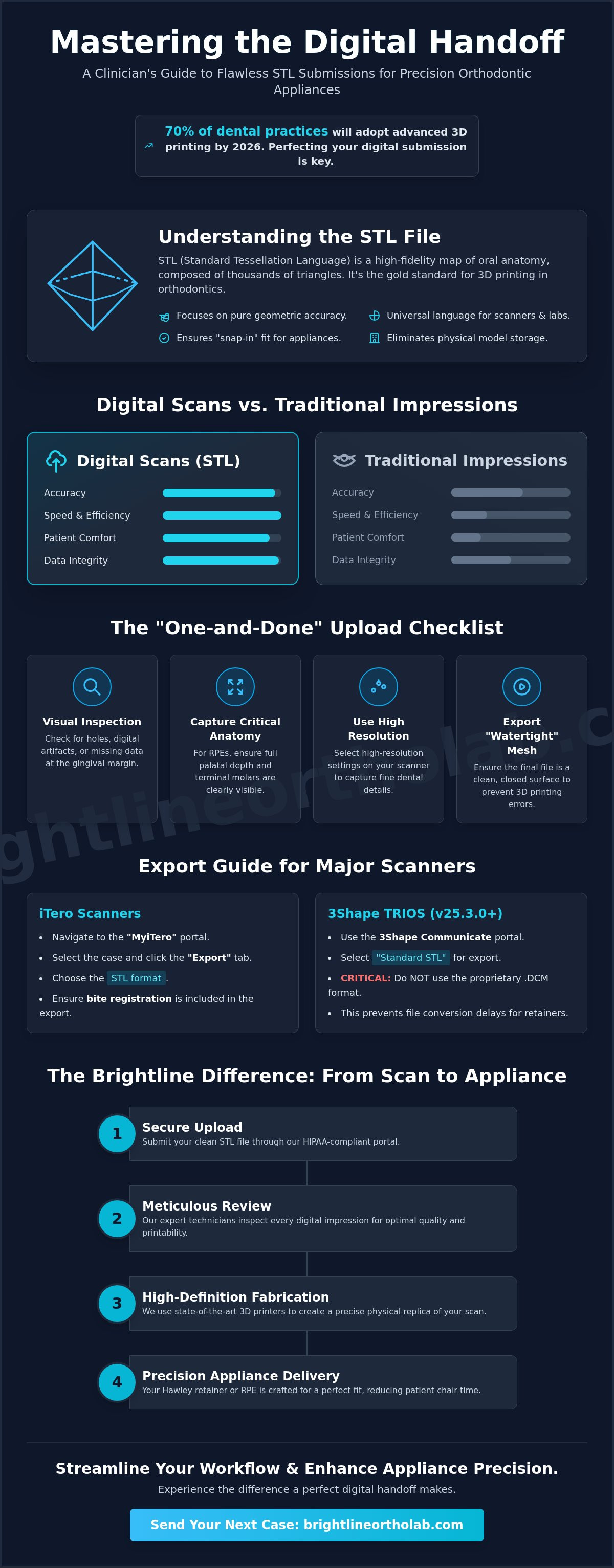
STL stands for Standard Tessellation Language. It's essentially a high-fidelity map of a patient's oral anatomy made up of thousands of tiny, interconnected triangles. While newer formats like PLY or OBJ capture color and texture, the STL remains the gold standard for orthodontic fabrication because it prioritizes pure geometric accuracy. When you send stl file for dental model production, you're providing the raw spatial data needed to print a high-definition physical replica. This format is a cornerstone of CAD/CAM dentistry, acting as the universal language between your scanner and our laboratory equipment.
The shift toward digital workflows has transformed how we manage practice logistics. Traditional stone models are fragile and require massive amounts of physical storage space. Digital files exist in the cloud or on a secure server, which eliminates the risk of model breakage during shipping and removes the burden of maintaining a physical archive in your office. We support "open" digital scanning systems because they offer you the most flexibility. Unlike closed systems that lock you into a specific manufacturer's ecosystem, open STL files allow you to collaborate with the lab of your choice without proprietary barriers.
Why STL is Essential for Orthodontic Precision
Precision is the heartbeat of a successful orthodontic appliance. STL files represent the surface geometry of the teeth and gingiva with meticulous detail. This data is critical when creating 3d printed dental models that serve as the foundation for Hawley retainers or Rapid Palatal Expanders (RPE). If the digital-to-physical translation is accurate, the resulting appliance will have a "snap-in" fit. This accuracy ensures that biocompatible materials used in fabrication interact correctly with the patient's anatomy, which significantly reduces the need for chairside adjustments.
Digital vs. Traditional Impressions
Traditional impressions are prone to "expansion error." Alginate and PVS materials can distort during the setting process or due to temperature changes during transit. Digital scans bypass these variables entirely. By choosing to send stl file for dental model manufacturing, you're opting for a workflow that is faster and more reliable. There's no need to pack boxes or wait for a courier. Beyond the technical benefits, patient comfort is significantly higher. Eliminating the "goop" of traditional trays makes the impression phase a positive experience for patients, especially those with sensitive gag reflexes. It's a cleaner, more efficient way to start every case.
How to Export STL Files from Major Intraoral Scanners
Exporting a digital impression is more than a final clerical step; it's the bridge between your clinical work and our laboratory's craftsmanship. Before you prepare to send stl file for dental model fabrication, perform a thorough visual check of the raw data. For appliances like Rapid Palatal Expanders (RPE), ensure you've captured the full depth of the palate and the terminal molars. If the scan has holes or missing data at the gingival margin, the resulting appliance won't have the precise fit your patient expects. High-resolution settings are preferred for orthodontic work to capture the fine details of the dentition.
The STL file format is the industry standard because it describes the surface geometry of a 3D object using a raw, unstructured triangulated surface. While your scanner might offer proprietary formats that include color data, these aren't necessary for fabricating 3D printed models or retainers. Focus on exporting clean, "watertight" meshes that represent the patient's anatomy without digital noise or artifacts.
Exporting from iTero and 3Shape TRIOS
If you're using an iTero scanner, you'll need to navigate the "MyiTero" portal to access your files. Select the specific case, click on the "Export" tab, and choose the STL format. It's vital to ensure the bite registration is included in the exported zip folder. For 3Shape TRIOS users running the latest 25.3.0 software, use the 3Shape Communicate portal. Always select "Standard STL" rather than the proprietary .DCM format. This ensures our team can immediately begin the design process for your Essix or Hawley retainers without file conversion delays.
Medit and Carestream Workflow Tips
Medit users should take advantage of the latest Medit Link v3.4.10 software to streamline their exports. When you're ready to send stl file for dental model processing, select the "CAD-ready" export option. This setting automatically aligns the arches and cleans up peripheral data. For Carestream users, always choose the "STL" export rather than "CS Mesh." Use a consistent naming convention, such as "PatientLastName_ApplianceType," to help us track your case through our system. If you're unsure about your scanner's specific settings, our team at Brightline Orthodontic Lab is happy to walk you through the setup to ensure your first submission is a success.
Verify the file integrity by opening the exported STL in a basic 3D viewer before clicking the upload button. Look for "floaters" or disconnected data points that might have been caught during the scan. A clean export ensures a "one-and-done" upload process, which ultimately reduces patient chair time and gets your appliances back to your office faster.
The Process for Sending STL Files to Brightline Orthodontic Lab
Submitting your digital impressions shouldn't feel like sending data into a void. We've designed our submission process to be as meticulous as our fabrication. To send stl file for dental model processing, you can utilize our secure digital portal or send files directly via email to brightlineortholab@gmail.com. This flexibility supports your existing workflow while ensuring your data arrives intact. We accept scans from all major systems, including iTero, MEDIT Link, DS Core, and 3Shape, allowing you to bypass the logistical delays of physical shipping and move straight into production.
Our standard in-lab turnaround time is 5 business days, which is made possible by the speed of digital transfers. Once your file is uploaded, our team conducts a preliminary review to ensure the data is complete. This proactive step prevents the frustration of discovering a scan error days later. We act as an extension of your team, providing a reliable bridge between your intraoral scanner and the finished appliance.
Completing the Digital Prescription
A precise appliance starts with a detailed prescription. When you submit your case, use the digital notes to provide specific instructions for appliances like hawley retainers. You can specify wire preferences, such as labial bow thickness, and choose from a variety of acrylic colors to match your patient's preference. If you're managing a complex expansion case, clearly outline the requirements based on how RPE appliances work, including the desired screw type and activation schedule. Setting a requested delivery date within the portal helps us align with your schedule and ensures your patient's appointment stays on track.
Data Security and Patient Privacy
Patient privacy is a non-negotiable priority for any modern practice. We utilize encrypted file transfers to maintain strict HIPAA compliance throughout the digital handoff. If your practice protocols require it, you can anonymize files by using patient ID numbers instead of full names in the file titles. Our commitment to security ensures that sensitive data remains protected while it's in transit and while it's stored on our secure servers. This professional layer of protection allows you to focus on clinical care with the confidence that your digital records are handled with the highest level of integrity.
Confirmation is the final step in a successful submission. Once you send stl file for dental model fabrication, you'll receive a confirmation protocol to verify that the files were successfully received and accepted into our production queue. Since we handle billing on a monthly basis via QuickBooks rather than on a per-case basis through our website, the submission process remains streamlined and focused entirely on the clinical needs of your patient. It's a professional, efficient workflow that respects your time and your practice's productivity.
Troubleshooting Common STL Export and Fit Issues
Even with the most advanced intraoral scanners, digital files can sometimes fall short of the precision required for high-quality fabrication. When you prepare to send stl file for dental model production, identifying mesh errors early saves significant chair time and prevents laboratory delays. "Holes" in the mesh, technically known as non-watertight models, occur when the scan data doesn't form a continuous surface. If a file isn't watertight, 3D printing software cannot recognize the object as a solid volume, which often leads to failed prints or distorted anatomy in the final 3D printed models.
Digital "noise" or artifacts also compromise the integrity of your submission. These are typically stray data points captured from the cheeks, tongue, or pooled saliva that appear as floating fragments in the STL viewer. While modern software like MEDIT Link v3.4.10 or 3Shape 25.3.0 includes automated repair tools, they can't always distinguish between an artifact and a critical anatomical feature. Meticulousness during the scanning phase is the best defense against these issues. Additionally, ensure your export settings are set to "solid" rather than "hollow." While hollow shells save resin for in-office printing, our laboratory needs a solid base to ensure the structural integrity of your appliances during the manufacturing process.
Proper occlusal clearance is another frequent hurdle. This data is especially vital when fabricating a hard soft night guard. If the digital record lacks sufficient vertical clearance or clear occlusal stops, the dual-laminate material won't have the necessary space to function correctly. This results in a "high" bite that requires extensive chairside grinding or, in some cases, a complete remake.
Fixing Incomplete Scans
Incomplete scans are most common in the posterior regions or along the gingival margins. Check these areas carefully before finalizing the case. Most software allows you to "patch" small holes by interpolating surrounding data, but use this feature with caution. If the missing data is on a critical load-bearing surface, such as a molar cusp or the area where an RPE band will sit, a quick rescan is the only way to guarantee accuracy. It's much faster to spend two extra minutes with the patient than to wait for a replacement appliance.
Ensuring Proper Bite Alignment
A "shifted" bite is a frustrating error that usually stems from patient movement or soft tissue interference during the bite registration scan. Always verify the maxillary and mandibular relationship in your STL viewer before you send stl file for dental model reviews. If the arches appear misaligned or "floating" in the digital space, the bite was not captured correctly. For the most stable results, capture the scan in centric relation and ensure the patient remains still until the software confirms a successful bite lock.
Ready to experience a smoother digital workflow? Partner with Brightline Orthodontic Lab today for meticulous case review and precision-engineered appliances that fit perfectly the first time.
The Brightline Difference: From STL to Finished Appliance
The moment you click the send button, our internal quality control process begins. We don't simply feed your data into a printer; our seasoned technicians perform a manual verification of every incoming file. When you send stl file for dental model fabrication, you're trusting us with your patient's clinical outcome. We take that responsibility seriously. Our review process checks for subtle scan distortions and ensures the bite alignment is preserved during the transition from digital data to a physical model. This technician oversight bridges the gap between raw data and a finished appliance that fits perfectly at the chairside.
Optimizing your data is a delicate balance of modern technology and traditional craftsmanship. While the digital file provides the geometric blueprint, our team uses years of expertise to ensure the 3D printed model is stable and accurate. This meticulous approach is what separates a generic print from a precision-engineered orthodontic appliance. We've streamlined our digital portal to ensure that once a file is accepted, it moves immediately into our production queue. This efficiency allows us to maintain our standard 5-business-day turnaround time without sacrificing the quality of your Hawley retainers or night guards.
Precision-Engineered 3D Models
Quality starts with the material selection. We use high-performance, medical-grade resins to create durable 3D printed models that resist chipping and thermal distortion. Unlike many laboratories that print hollow shells to reduce material costs, we print our models solid. This choice ensures a cleaner, more professional appliance presentation and provides a much more stable foundation for fabricating complex appliances like Rapid Palatal Expanders (RPE). Every arch undergoes internal quality checks to verify that the printed geometry matches your digital submission exactly.
A Collaborative Partnership
Digital dentistry shouldn't feel like a cold, automated transaction. We're here to act as a reliable ally and an extension of your team. If we spot a potential fit issue during the digital review, we'll reach out to discuss the case before production begins. You have direct access to our technicians for digital case consultations, ensuring that even the most complex cases are handled with care. Whether you're a digital veteran or just starting to send stl file for dental model data for the first time, we're here to support your practice's transition and simplify your daily workflow.
We're proud of our history but remain focused on your immediate needs. By combining the soul of traditional craftsmanship with modern 3D printing technology, we provide appliances that meet the highest standards of accuracy and longevity. Ready to see the difference for yourself? Submit your first digital case to Brightline today and experience a partnership built on dependability and precision.
Elevating Your Practice with Digital Precision
Master the technical requirements of your intraoral scanner to eliminate the logistical delays and inaccuracies of traditional impressions. By verifying your mesh integrity and bite alignment before submission, you ensure a "one-and-done" upload process that saves valuable chair time. When you're ready to send stl file for dental model fabrication, our team is standing by to translate your digital data into a high-fidelity appliance.
We bring over 18 years of specialized orthodontic expertise to every case. Our secure, HIPAA-compliant digital portal simplifies the submission process; it acts as a reliable extension of your clinical team. Whether you're submitting a complex RPE or a standard Hawley retainer, our meticulous review process guarantees accuracy from the very first print. We're proud to combine modern adaptability with the soul of traditional craftsmanship to support your professional goals.
Start your digital case submission with Brightline today and experience a partnership built on dependability and expertise. We look forward to supporting your practice's growth through digital excellence.
Frequently Asked Questions
What file format does Brightline Orthodontic Lab accept?
Brightline Orthodontic Lab accepts the STL (Standard Tessellation Language) file format as our primary digital standard. This universal format ensures that your data is compatible with our high-definition 3D printers regardless of which intraoral scanner you use. While some modern systems offer color-coded PLY files, the geometric precision of the STL is what we prioritize for fabricating accurate orthodontic appliances.
Do I need to send a physical impression along with the STL file?
You don't need to ship a physical impression once you successfully upload your digital scan to our portal. The digital file contains all the meticulous detail required for our technicians to begin the design process immediately. This transition to a digital workflow simplifies your office logistics and eliminates the costs and mess associated with traditional alginate or PVS materials.
How long does it take for the lab to process an STL file?
Our standard in-lab turnaround time for appliances created from digital files is 5 business days. Because your data arrives instantly via our secure portal or email, we can bypass the delays of physical shipping and move straight into the review phase. If you have a specific deadline for a patient, rush services are available to accommodate your practice's schedule.
Can I send STL files for all orthodontic appliances, including RPEs?
You can send stl file for dental model submissions for our entire product line. This includes everything from Rapid Palatal Expanders (RPE) to Hawley and Essix retainers. Digital workflows are particularly effective for complex appliances because they capture palatal depth and molar position with a level of detail that traditional impressions often miss.
Is there an additional fee for sending digital files vs. physical models?
We don't charge an additional lab surcharge for processing digital files. In fact, many clinicians find that digital submissions lower their total case cost by eliminating outbound shipping fees and impression material waste. You should check with your scanner manufacturer to see if they charge a separate fee for exporting open STL files to third-party labs.
What should I do if my scanner only exports proprietary file types?
Look for the "Standard STL" or "Open" export option within your scanner's software settings to bypass proprietary formats. Most modern systems, such as iTero or 3Shape TRIOS, offer a way to export universal files for lab collaboration. If you're unsure where to find these settings, contact your scanner’s support team or reach out to us for a brief technical consultation.
How do I know if my STL file is of high enough quality for printing?
Inspect the scan in your software's 3D viewer to ensure the mesh is "watertight" and free of holes on critical anatomical surfaces. Pay close attention to the gingival margins and occlusal surfaces of the molars. If the data appears distorted or has significant digital noise, a quick rescan is the best way to ensure the final appliance meets our standards for precision.
Can Brightline Orthodontic Lab archive my digital models for future appliance remakes?
Brightline Orthodontic Lab maintains a secure digital archive of your patient scans for future use. If a patient loses a retainer or requires a replacement appliance, we can often pull the original file from our records to begin fabrication immediately. This service helps your practice provide faster care without the need for an additional scanning appointment.